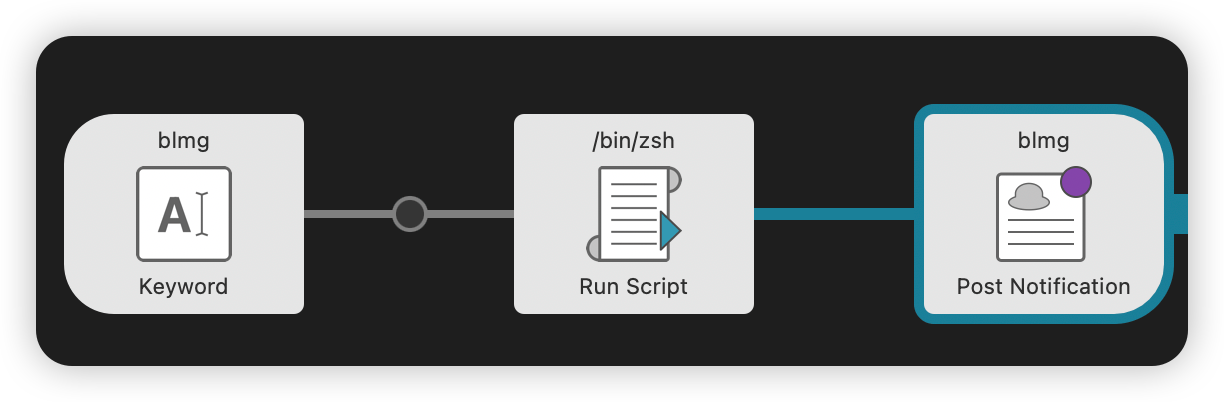
自从采用hexo写博客之后,遇到需要保存截图的地方,就比较繁琐。按照正常的流程,需要

  1. 使用截图软件的快捷键进行截图,这一步挺快
  2. 保存截图到指定的目录,选目录就比较麻烦
  3. 修改文件名,这一步也挺麻烦
  4. 将图片路径插入到markdown中去,这一步最麻烦,需要组装完整的访问路径。

之前买了Alfred Powerpack,支持自定义工作流,我在想能不能使用Alfre,自定义一个工作流,来实现我的需求。
花了不到半个小时,在AI的加持下,就实现了一个自定义截图工作流:

  1. 使用截图软件截图,图片会保存到剪贴板中
  2. 输入Alfred命令,将剪贴板中的图片保存到指定目录中,并在剪切板中保存markdown的图片路径格式,类似![20260315_dog0](/static/image/2026/20260315_dog0.png)
  3. 将图片路径粘贴到markdown对应的位置,搞定

我把这个工作流命名为blmg(blog image),有以下功能:

  • 可以自定义图片名,如果不输入图片名,则使用 yyyyMMdd_<随机4位字符串> 作为文件名
  • 文件父路径为 yyyyMMdd,这样按年归档,便于管理
  • 图片会进行压缩,减少上传体积

如果后期需要扩展,还可以添加其他功能,比如自动上传图片到图床等。

工作流:
20260315_alfred_clip_workflow

其中的脚本如下:

1
2
3
4
5
6
7
8
9
10
11
12
13
14
15
16
17
18
19
20
21
22
23
24
25
26
27
28
29
30
31
32
33
34
35
36
37
38
39
40
41
42
43
44
45
46
47
48
49
50
51
52
53
54
55
56
57
58
59
60
#!/bin/bash

input="$1"

# 博客静态目录
base_dir="/Users/liqiao/Devlopment/blog/source/static/image"
year=$(date +%Y)
date_str=$(date +%Y%m%d)

target_dir="$base_dir/$year"
markdown_path="/static/image/$year"

mkdir -p "$target_dir"

# 文件名前缀
if [ -z "$input" ]; then
rand=$(LC_ALL=C tr -dc a-z0-9 </dev/urandom | head -c 4)
filename="${date_str}_${rand}"
else
filename="${date_str}_$input"
fi

file_path="$target_dir/$filename.png"

# ---- 保存剪贴板图片 ----
tmp_file=$(mktemp /tmp/clip_XXXX.png)
osascript -e 'try
set theImage to the clipboard as «class PNGf»
set thePath to POSIX file "'"$tmp_file"'" as text
set theFile to open for access file thePath with write permission
set eof of theFile to 0
write theImage to theFile
close access theFile
on error errMsg
error errMsg
end try'

if [ ! -f "$tmp_file" ]; then
echo "Clipboard image save failed"
exit 1
fi

mv "$tmp_file" "$file_path"

# PNG 压缩(可选)
if command -v pngquant >/dev/null 2>&1; then
pngquant --force --output "$file_path" "$file_path"
fi

# 文件大小
filesize=$(du -h "$file_path" | awk '{print $1}')

# 生成 Markdown 并复制
markdown="![$filename]($markdown_path/$filename.png)"
echo "$markdown" | pbcopy
echo "$markdown"

# ---- 输出通知内容(Post Notification 使用) ----
# 单行,显示文件名 + 文件大小
echo "$filename ($filesize)"